What is the Polar Bear 2026 meme?
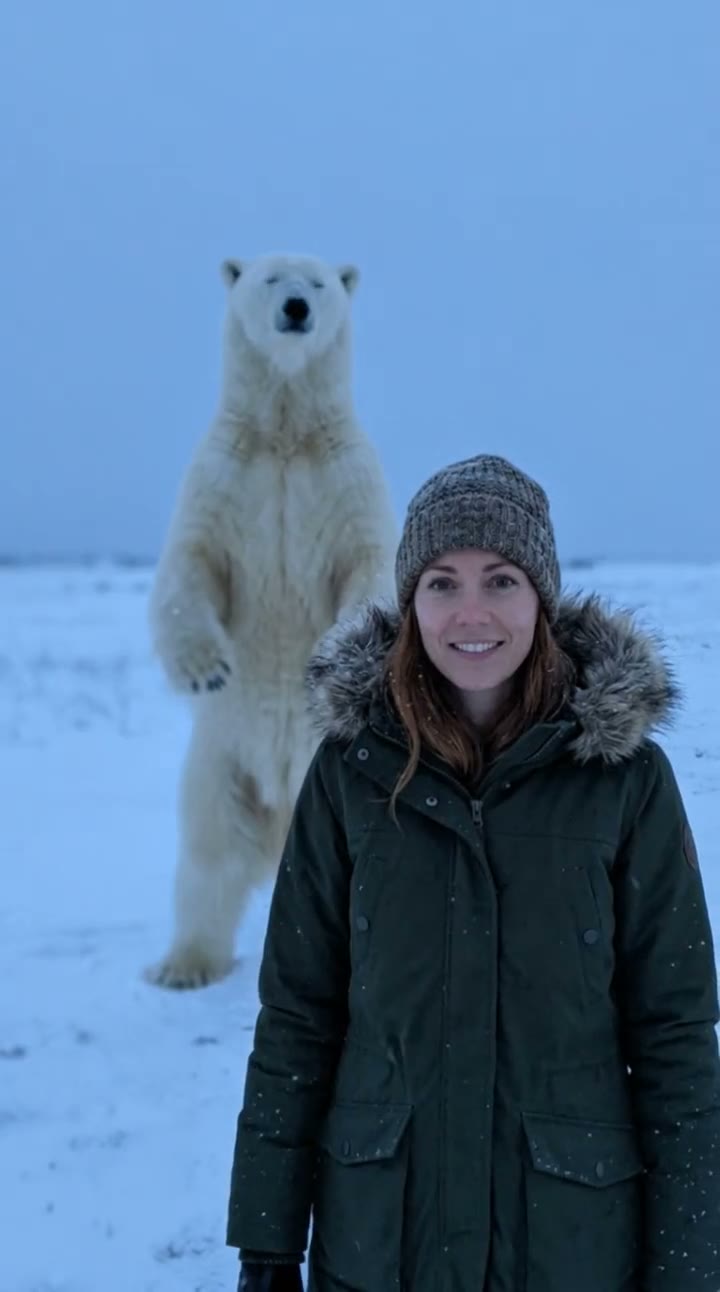
The Polar Bear 2026 meme started as a TikTok creepypasta: an eerie, slightly AI-looking picture of a polar bear, shared years ago as "a meme from November 2026 that you will not understand yet". People treated it as a message from the future. In 2026, AI clips of the bear calmly warning that November 2026 is coming brought it back, and now that November 2026 is actually here, everyone is posting their own version.
SelfieTrend makes yours from one photo. We first place you in an empty snowy field at dusk with the uncanny polar bear standing behind you, as a still you can check and adjust. Then we turn it into a 10-second vertical video with original sound: howling wind, an eerie music-box melody and a calm deep voice saying the line.
Updated November 2, 2026
How to make the Polar Bear 2026 video with AI
- 1
Upload one clear photo
One adult, front-facing, with the face fully visible. A sharp photo keeps your face true in the snowy scene.
- 2
Set up the bear
Keep the default eerie, blurry bear or describe your own take: closer, bigger, wearing a scarf, standing in the fog. Re-create the still until it feels right.
- 3
Make the video and download it
Confirm the credits and the bear steps closer. Download the MP4 and post it before November is over.
The video, beat by beat
0-3s
Unaware
You stand in the snow and smile into the camera. The polar bear stands far behind you, perfectly still.
3-7s
It moves
The bear tilts its head and takes two heavy steps closer. You turn around and freeze.
7-10s
The warning
The camera pushes in on the bear’s calm face as a deep voice says: "Remember. November 2026 is coming."
Tips for the best photo
Face the camera
A front-facing photo works best, because the video starts with you looking straight at the viewer.
Use soft, even light
Daylight from a window keeps your face natural in the cold blue dusk of the scene.
One person only
Group photos confuse the AI. Crop to one adult before you upload.
Skip heavy filters
Beauty filters and sunglasses hide the features the AI needs to keep you recognizable.
Why it works in November 2026
The whole joke of the meme is that it was waiting for this exact month. Posting your own Polar Bear 2026 clip now lands the punchline: the future meme finally makes sense. Caption it with something like "It’s November 2026. The bear was right." and tags such as #polarbear2026 #november2026 #aivideo.
Your free preview and the paid video
The free watermarked preview is your still: you in the snow with the polar bear behind you. The paid result is the 10-second video with the bear moving and the voice line. We do not offer an unwatermarked still download.
Pricing
Your first preview is free, watermarked and needs no sign-in; after that each preview is 5 credits. A video is 100 credits on any template. Credit packs are one-time payments valid for 365 days: 100 credits for $6.90, 500 for $24.90 ($4.98 a video) or 1,500 for $59.90 ($3.99 a video). You can also subscribe: Basic is $9.90 a month for 250 credits and Pro is $29.90 a month for 900. New accounts get 15 free credits. Sign-in is needed to buy and make the video, and a failed video returns its credits automatically.
Consent comes first
Only use photos of yourself or adults who agreed. Do not upload public figures or anyone under 18. Our sample clip uses a fictional AI person.
Frequently asked questions
Is the Polar Bear 2026 AI generator free?
The first preview is free, watermarked and needs no sign-in, so you can see yourself with the bear before paying. The video is 100 credits, from $6.90.
How much does the video cost?
A video is 100 credits on any template: $6.90 for 100 credits, $24.90 for 500 ($4.98 a video) or $59.90 for 1,500 ($3.99 a video), one-time and valid for 365 days. Monthly plans start at $9.90. A failed video returns its credits automatically.
Does the video say "November 2026 is coming"?
Yes. The sound is generated with the video: howling wind, an eerie music-box melody and a calm deep voice saying "Remember. November 2026 is coming." AI voices can vary a little between videos.
How long is it and what format?
10 seconds, vertical 9:16, with generated sound, ready for TikTok, Instagram Reels and YouTube Shorts.
Can I change how the bear looks?
Yes. The description box lets you change the bear and the scene: closer or farther, in fog, with a scarf, at night. You, the snowy field and the polar bear stay as the base of the scene.
Can I use a photo of my pet instead?
This page is made for a photo of one adult standing in front of the bear. For pets, try our AI pet video generator.
Is my photo private?
Yes. Your photos and results stay in your private library and are never added to a public feed. Only upload photos of yourself or people who agreed.