What is the Tiny Desk AI trend?
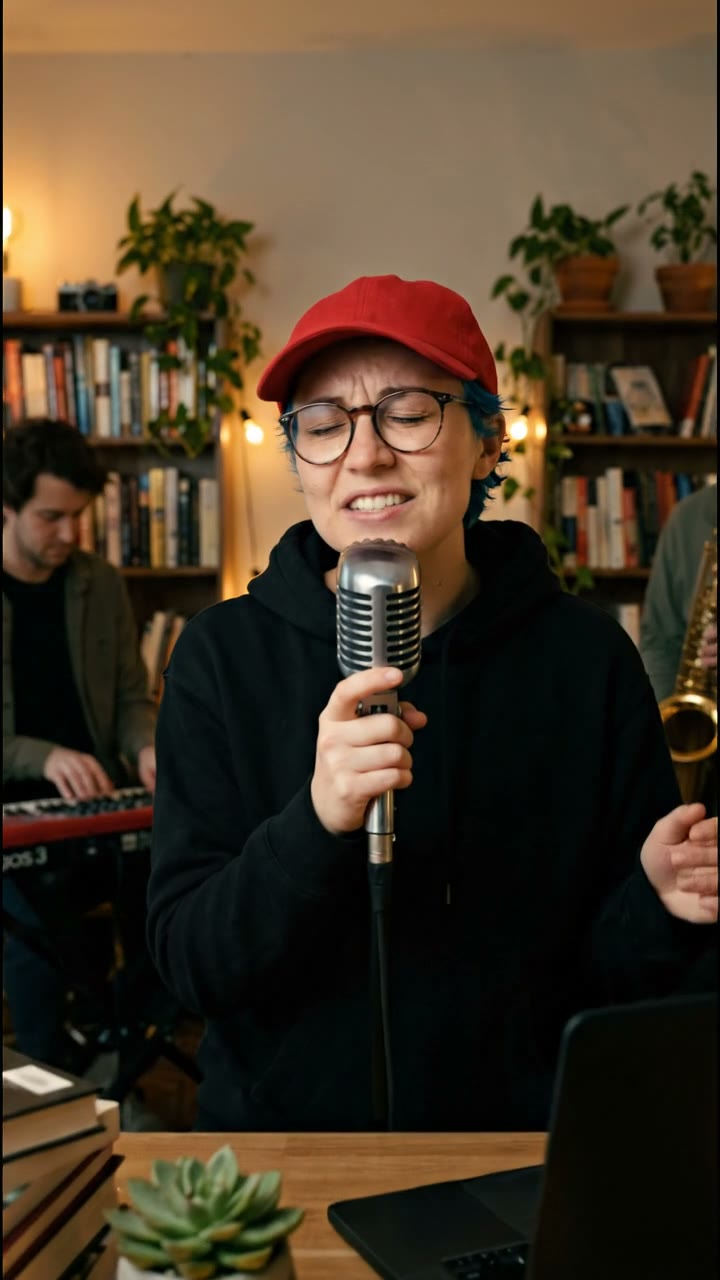
Tiny Desk AI videos imagine you as the star of an intimate office concert: a cluttered wooden desk, warm lamps, bookshelves, a band squeezed in behind you and a single microphone. The look borrows from the stripped-back desk sessions music fans love, and the AI version lets anyone take the lead singer’s spot from a single photo.
SelfieTrend gives you two ways to do it. The quick way: “Put me in this clip” swaps you in as the lead singer of our desk-concert clip in one step, keeping the band, the camera move and the sound. The custom way: “Create my own scene” first places you behind the desk as a still image so you can change the outfit, instruments or room, then turns it into an 8-second vertical video with generated vocals and music. The character still is a free preview; you only pay for the video.
Updated October 29, 2026
How to make a Tiny Desk AI video
- 1
Upload one clear photo
Use a recent photo of yourself, or of an adult who agreed to it. Face the camera, keep your eyes and mouth visible and avoid heavy filters. You can tweak the scene description, for example the cap, the outfit or the instruments.
- 2
Check your desk-concert character
We generate a still of you behind the desk with the mic. Look at the face and the details. Not quite right? Run it again. Happy with it? Choose “Make the video”.
- 3
Make the video and download it
Confirm the video price and we animate the scene: you sing, the band plays, the camera slowly pushes in. Download the MP4, then post it to TikTok, Reels or Shorts.
The clip, beat by beat
0–2 s
The wide shot
You at the desk, mic in hand, keys and sax behind you, lamps glowing.
2–5 s
The push-in
The camera drifts closer as you lean into the first line.
5–8 s
The close-up
Eyes closed, full voice, the moment people replay.
Photo tips for a better result
One person, front facing
Crop other people out. A straight-on selfie from the chest up gives the model the most to work with.
Soft, even light
Daylight from a window beats a ring light or harsh shadows. Hard shadows can change your face in the result.
Keep your look recognisable
Glasses, hair colour and freckles carry over well. Sunglasses and face-covering hats do not.
Describe the vibe, not the face
Use the description to change the outfit, instruments or room. Leave your face to the photo.
The “outstanding” Tiny Desk AI template
Many Tiny Desk AI clips end on the same joke: the performance is so good that the caption calls it outstanding. Our template is built for that moment. “Put me in this clip” drops you into a finished desk concert in one step, so you can post your outstanding Tiny Desk AI video the same day the trend reaches your feed. Want a different band, outfit or room? Use “Create my own scene” instead.
Adding the trend sound
Your video comes with generated vocals and music, so it plays on its own. If you want the exact song that is trending, upload the MP4 to TikTok or Instagram, turn the original sound down and add the trending audio from the app’s sound library. Line the chorus up with the close-up at around five seconds.
Caption ideas
Try “POV: they finally gave me the desk”, “my Tiny Desk debut, AI edition”, “auditioning for the desk, one photo at a time” or “no band, no desk, no problem”. Tag it so friends can try their own.
Pricing
In “Create my own scene” your first character still is a free, watermarked preview; once you have a video in your balance, you can re-run it until you like it. You only pay when you turn it into a video: $6.90 for one video or $24.90 for five, at any resolution, with no subscription. “Put me in this clip” goes straight to the video and costs one video. If a video fails, it is returned to your balance automatically.
Not affiliated with NPR
SelfieTrend is an independent AI video tool. “Tiny Desk” describes the style of video people search for; we are not affiliated with or endorsed by NPR or its Tiny Desk Concerts series. Our preview clips use fictional AI people.
Frequently asked questions
Can I make a Tiny Desk AI video with just one photo?
Yes. Upload one clear photo of yourself or a consenting adult. “Put me in this clip” swaps you into our desk-concert clip in one step; “Create my own scene” makes a still of you as the lead singer first and turns it into an 8-second video once you approve it.
How much does it cost?
The character preview is free. Each finished video costs $6.90, or $24.90 for a pack of five, whatever the resolution. There is no subscription, and a failed video is returned to your balance.
Does the video have sound?
Yes. The video is generated with vocals and music. You can also mute it and add a trending sound in TikTok or Reels.
Can I change the outfit or the band?
Yes. Edit the scene description before you create the character: change the cap, the hoodie, the instruments or the room. Your face comes from your photo.
Why does the face sometimes look different?
AI likeness depends on the photo. Use a sharp, well-lit, front-facing photo of one person and check the character image before you make the video. If it is off, run the character step again.
Can I use a photo of a celebrity or a friend?
Only use photos of yourself or of adults who gave permission. Photos of public figures and of anyone under 18 are not allowed.
Is my photo shared publicly?
No. Your photo and results stay in your private library. Trend videos are never added to the public explore feed.
Is this made by NPR or Tiny Desk?
No. SelfieTrend is independent and not affiliated with NPR. The page describes the style of video people search for.